

Have you ever collected the keys to a brand-new home and realized nobody explained what happens if the septic pump alarms at 2 a.m.? That gap is exactly why remote septic tank monitor belongs in the new-build plan, not after move-in.
- The Three Real Reasons New Builds Should Start with Monitoring
- Remote Septic Tank Install Checklist Before Turnover
- Remote Septic Tank Monitoring Hardware to Install Before the Keys
- Why Septilink Fits New-Build Turnover
- Installation Verification for Remote Septic Tank Monitoring Systems
- The Turnover Pack the Homeowner Should Receive
- Common New-Build Mistakes And How to Avoid Them
- Final Thoughts
In a new build, monitoring is not just an add-on. It is a practical way to protect the homeowner, the installer, and the system itself, before the first “something’s wrong” call ever happens.
The Three Real Reasons New Builds Should Start with Monitoring
Remote monitoring matters most when it starts at commissioning. That is when you have full access, clean wiring, and a system operating the way it was designed. From there, three benefits stack up quickly.
1) You Establish a True Baseline From Day One
The most valuable diagnostic asset is knowing what “normal” looks like for that specific system. When monitoring is active from the beginning, you capture pump activity patterns, alarm states, and power events while everything is new and operating correctly.
That baseline becomes the reference point for the next year and beyond. If cycle counts spike, run times stretch, or behavior drifts, you are not guessing. You can see deviations from normal early, before a high-water event, before damage, and before a homeowner panic call.
2) You Reduce Warranty Risk for the Installer
Installers are often responsible for the system during the warranty period (commonly two years). The challenge is that many call-backs are not pure equipment failures. They are caused by misuse, overload, power issues, or tampering.
Monitoring helps separate “system defect” from “site reality.” When you can track events like power loss/restoration, enclosure access, alarm history, and pump behavior trends, you limit avoidable liability and reduce unnecessary truck rolls. You also create a factual record that supports faster diagnosis and cleaner warranty decisions.
3) You Meet Modern Homeowner Expectations
Homeowners now expect an app for critical systems. They have visibility into thermostats, security, and appliances, yet septic is often a mystery until something goes wrong.
A mobile monitoring experience closes that gap. It gives owners clear alerts, status visibility, and a direct connection to their service provider. The result is less confusion at move-in and a higher likelihood the owner works with the installer to keep the system operating correctly.
Now, let’s move into the build-stage checklist. This is the part that keeps the install clean, serviceable, and easy to commission, so monitoring works from day one, not “someday after move-in.”
Remote Septic Tank Install Checklist Before Turnover
Planning beats patching. When you install monitoring during construction, you control access, wiring, documentation, and testing. You have a baseline of how the data should look when the system is operating correctly.
Control Panel Readiness
Treat the panel like a critical system, because it is:
- Put the control panel on a clearly labeled circuit
- Keep wiring tidy and documented, with simple labels for each input
- Plan surge protection based on local electrical practice and site risk
Placement And Service Access
Install for the next service visit, not only for today:
- Mount the monitor where a technician can reach it without moving furniture or cutting landscaping
- Protect the device from spray, standing water, and condensation risk
- Route cables with strain relief, so nothing loosens under vibration or temperature change
Connectivity Decisions
Decide connectivity before the homeowner owns the network:
- Cellular monitoring avoids dependence on homeowner Wi-Fi
Run a basic signal check at the planned panel location before you close up the finishes. This single step prevents the classic mistake of installing good hardware in a dead zone.
Once the checklist is in place, the next question becomes practical: what should you install before the keys change hands so the system works from day one?
Remote Septic Tank Monitoring Hardware to Install Before the Keys
After occupancy, every change becomes harder. Scheduling gets messy, and access becomes limited.That is why the “before the keys” install list matters.
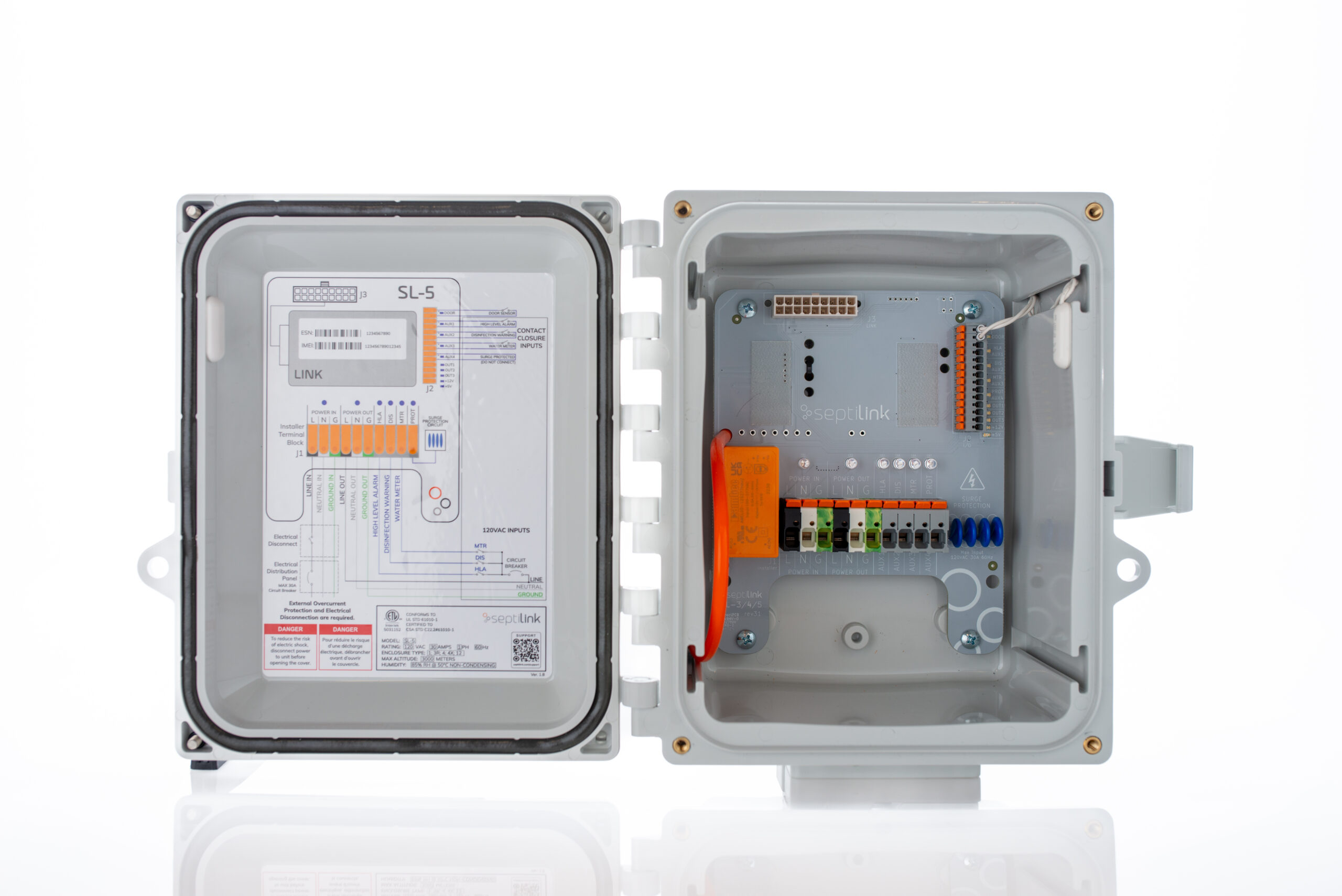
Core Hardware Stack
Most new builds benefit from a simple, proven stack:
- A monitoring device that integrates with the control panel and reads alarm states, pump activity, and power events
- A high-water alarm input if the system does not already have it into the panel
- Sealed cable glands and proper strain relief
- Clear labels for pump, floats, alarm input, monitor power, and service contact
One-Minute Pre-Turnover Decision Table
| New-Build Condition | Best-Fit Monitoring Approach | Why It Works Before Turnover |
| Rural site | Cellular-based monitoring | Keeps alerts stable when internet changes |
| Systems with water pumps. | Panel-based pump tracking | Shows run time and cycle patterns early |
| Aerobic treatment unit | Air pressure or aerator input | Flags treatment issues before complaints start |
| Vacation home or second home | Alerts plus event history | Helps owners act without being on-site |
| HOA or shared oversight | Service Provider Notifications | Addresses issues quickly before they are catastrophic, |
With the hardware approach set, you can now evaluate a vendor fit. That is where the client section belongs, because selection should follow requirements, not the other way around.
Why Septilink Fits New-Build Turnover
Septilink fits new-build handover because it focuses on control-panel level monitoring, where alarms and performance signals live. That gives you practical visibility into how the system behaves, not only a single reading.
At Septilink, we designed our SL-series approach to sit in line with the septic control panel power path, then monitor system behavior and alarm states. That structure supports cleaner commissioning because you can validate the loop before the homeowner moves in.
- We support a handover-friendly setup that does not depend on homeowner Wi-Fi
- You can track alarms, power events, and pump behavior patterns with history logs
- Service teams can use logged events to diagnose faster and reduce repeat visits
- Builders can reduce warranty noise by catching abnormal patterns earlier
After vendor fit comes the step many projects skip. Commissioning is where monitoring becomes real, because tests prove alerts and logs work under real conditions.
Installation Verification for Remote Septic Tank Monitoring Systems
Installation is not the finish line. Commissioning is the proof.
Functional Tests
Run tests that mirror real failures:
- Trigger the high-water alarm input and confirm alert delivery
- Verify pump activity logging records, run time and cycles
- Cut power briefly and restore it, then confirm the system records both events
Notification Tests
Make alerts actionable:
- Confirm the correct person receives alerts and understands what they mean
- Test escalation, so a missed alert does not become a missed problem
- Name the site clearly so nobody confuses properties in the app
Documentation Tests
Make the first service call easy:
- Add a wiring snapshot and a one-page alert guide to the handover pack
- Put the service contact details inside the panel door
Once commissioning is complete, you can hand over a system that the homeowner can operate with confidence. That handover depends on what you deliver, not only what you install.
The Turnover Pack the Homeowner Should Receive
Homeowners want clarity. They do not want a binder that nobody opens. Include:
- A system map showing tank, risers, drain field, and control panel location
- A short glossary for common terms like high-water alarm, float, pump, and aerator
- A simple “what to do first” list for each alert type
- Maintenance reminders for inspection and pumping schedules
- A clear note on monitoring account ownership and access roles
This pack reduces panic calls and cuts confusion during the first year, when homeowners are still learning the home. Even with a strong handover pack, mistakes still happen in new builds. The next section prevents those mistakes from repeating across projects.
Common New-Build Mistakes And How to Avoid Them
Installing Where Nobody Can Service It
Panels behind fixed cabinetry, tight storage rooms, or blocked enclosures create slow and costly service visits. Install for access.
No Clear Alert Owner
If everyone receives alerts, nobody owns them. Assign ownership and escalation rules during commissioning.
Confusing Level With Performance
Level sensors can help, but pump behavior and alarm states often show issues earlier. Choose monitoring based on system design and risk.
Treating Monitoring as Optional
One emergency pump-out plus a weekend callout can cost more than a clean monitoring install. Builders understand that math when they track warranty costs.
These mistakes all point to the same theme: planning. Planning creates reliability. Reliability creates fewer callbacks. That is exactly where a new-build project should land.
Final Thoughts
New builds should not hand over blind systems. When you plan monitoring beforehand, you protect the homeowner, reduce warranty calls, and give service teams a factual starting point. Start with the signals you want, install with service access in mind, commission with real tests, and hand over with clear documentation.
If you want remote septic tank coverage that fits a handover workflow and stays dependable after move-in, order Septilink monitoring as part of your new-build closeout plan.
FAQs
What Does a “Normal” Pump Cycle Pattern Look Like in a New Build?
Normal depends on pump type, tank size, and household load. The key is consistency. Sudden increases in cycles or run time often signal float issues, infiltration, or pump wear.
Do Monitoring Alerts Replace Routine Pumping And Inspections?
No. Monitoring supports early detection and faster response. Pumping schedules and inspections still protect the drain field, prevent solids carryover, and maintain treatment performance.
What Should a Builder Document for Warranty Protection?
Document the wiring diagram, alarm input mapping, commissioning test results, and the alert contact list at handover. Clear records reduce disputes when issues occur.
Can a Homeowner Change Notification Contacts Without Breaking the Setup?
Yes, if the platform supports role-based contacts. The homeowner should update contacts at move-in, then keep a service role active for faster troubleshooting when an alert appears.
What Should You Do First When a High-Water Alert Triggers?
Stop high water use, check for obvious power loss or tripped breakers, and contact service if the alert persists. Fast action can prevent overflow, property damage, and drain field stress.
Leave a Reply